An Apollo Twin X photo with a knob you can turn
The first time I heard my vocal dry, I closed the laptop. Twenty-eight plug-ins later, it sounded like a record. This knob lets you hear both.
Apollo Mix Knob is a web audio piece: a product photo of Universal Audio's Apollo Twin X, taken apart and rebuilt so its big knob turns in the browser. It opens on my raw vocal. Turn it right and the doubles come in, then the mixed vocals, then the finished song. Under it is a four-take crossfade built on the Web Audio API.
It's for anyone who's wondered what mixing does to a voice, and for designers who want a photo to behave like the device in it. It's shipped, and it plays in any browser with Web Audio.
The song is my cover of Tame Impala's "Eventually", recorded on my Mac's built-in microphone and mixed with UAD plug-ins.
Nothing on the panel is a video. The ring of LEDs around the knob, the CH1 and CH2 input meters and the MONITOR meters are all drawn by code, and they follow the audio that's playing.
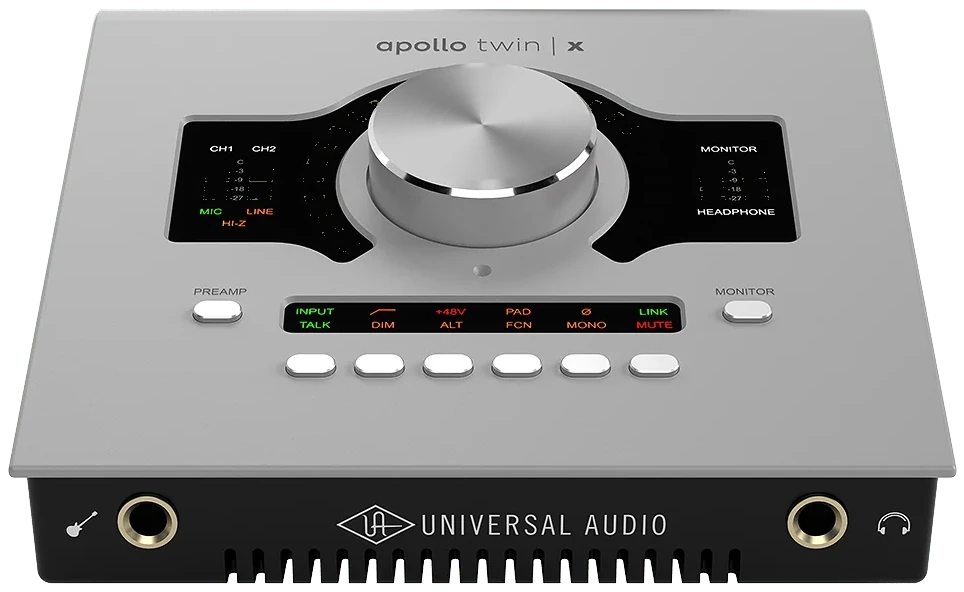
Turn the knob right, from my raw vocal through the doubles to the full mix.
The knob puts the before and the after on one control, so you hear the mix arrive instead of reading about it.
Paint the LEDs out, then draw them back in SVG
Apollo Mix Knob is a teardown of a photo. Every LED was painted out of the image, then drawn back as an SVG shape.
Each shape is measured in the photo's own pixels: 20 segments around the knob and 20 meter cells, four columns of five.
Code decides which ones are lit. The ring shows how far into the mix you are. CH1 and CH2 meter the raw vocal coming in, and MONITOR meters what comes out.
The obvious version is a stack of pre-rendered frames, one photo per knob position. It looks fine until the meters move. The ring alone has 21 states, and each one meets every meter combination (that's a lot of photos, each showing a level someone guessed).
Drawing the LEDs back means one image, 40 shapes and no guessing. The colours are sampled from the hardware render, not the site's palette.
That render is Universal Audio's, not a photo I took (I don't own the hardware), and a new photo would mean measuring all 40 shapes again.
Together: the ring lit to 70%, the meters on a level, the face turned to match.
Turning writes straight to the DOM and to the gain nodes, so a drag never waits on a React render.
My test for a photo you can touch: if you lit one LED by hand, would it match its neighbours? If it wouldn't, it isn't measured yet.
Turn the knob's brushed streaks, not the light
A real knob turns under a fixed lamp. The brushed metal spins, and the highlight stays put.
The obvious version rotates the whole knob image. Then the highlight spins too, and the knob looks like a sticker on a turntable.
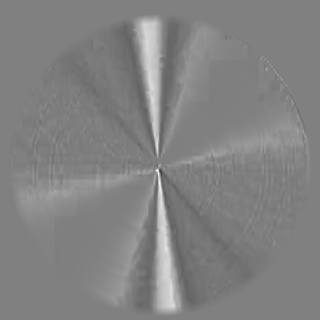
So the face is split in two. The lighting stays baked into the photo. The fine streaks are a separate texture, centred on the point the brushing spirals from, and blended back with soft-light. Only the texture turns.
The cost is that the light never moves. That's right for a lamp that stays put, and wrong for a knob you'd tilt in your hand.
The camera looks down at an angle, so the round face reads as an ellipse. The texture turns in its own plane first, then gets squashed to the photo's perspective (60 pixels tall for every 113 wide).
The knob travels 270 degrees, like a real pot.
At the full-mix end the face matches the photo exactly.
Keep all four takes on one Web Audio clock
The knob crossfades four bounces of one song: my raw vocal, the raw doubles, the mixed vocals and the full mix. It only works if they stay locked to the sample.
Four <audio> tags drift, most of all in Safari. So every take is decoded into a Web Audio buffer and started on one clock, 50 ms ahead, so they leave on the same sample.
All four came out of one session, 14,111,680 samples each. I cut every file at the same sample, 16.5 seconds in, so Play opens on the voice instead of the intro.
Then the curve. A linear fade is right for two copies of one sound. An equal-power fade is right for two different sounds. This knob has both.
The raw vocal and the doubles correlate at 0.94 (the doubles still carry the lead). The doubles and the mixed vocals correlate at 0.01, the mixed vocals and the full mix at 0.31. So each pair gets a curve scaled to its own number, and the volume stays flat across the turn.
Loudness is matched too, at about -22 LUFS, so turning the knob changes the mix and not the volume.
Four takes are 12.2 MB, too much to fetch on a click. The raw vocal downloads as the knob nears the screen and the rest when a pointer reaches it. Play waits for one decode, and the others join on the same clock.
The meters read the real signal. Each frame takes the peak of the last 2,048 samples and lights the rows printed on the panel (C, -3, -9, -18 and -27). They rise at once and fall at 30 dB a second, like the hardware.
Limitations
It plays one song. The curves are tuned to how these four takes correlate, so a new song would mean measuring its pairs and loudness again.
Without Web Audio, it shows the panel and says it can't play, rather than failing silently.
A teardown only counts if it goes back together, and this one turns.